
Company Settings
Company settings control the default behavior of KartuStok for all users in a company. Review these settings before master data and transaction work starts.
Menu Location and Access
Open Manage -> Settings. The role must include settings view or update access.
Important Settings
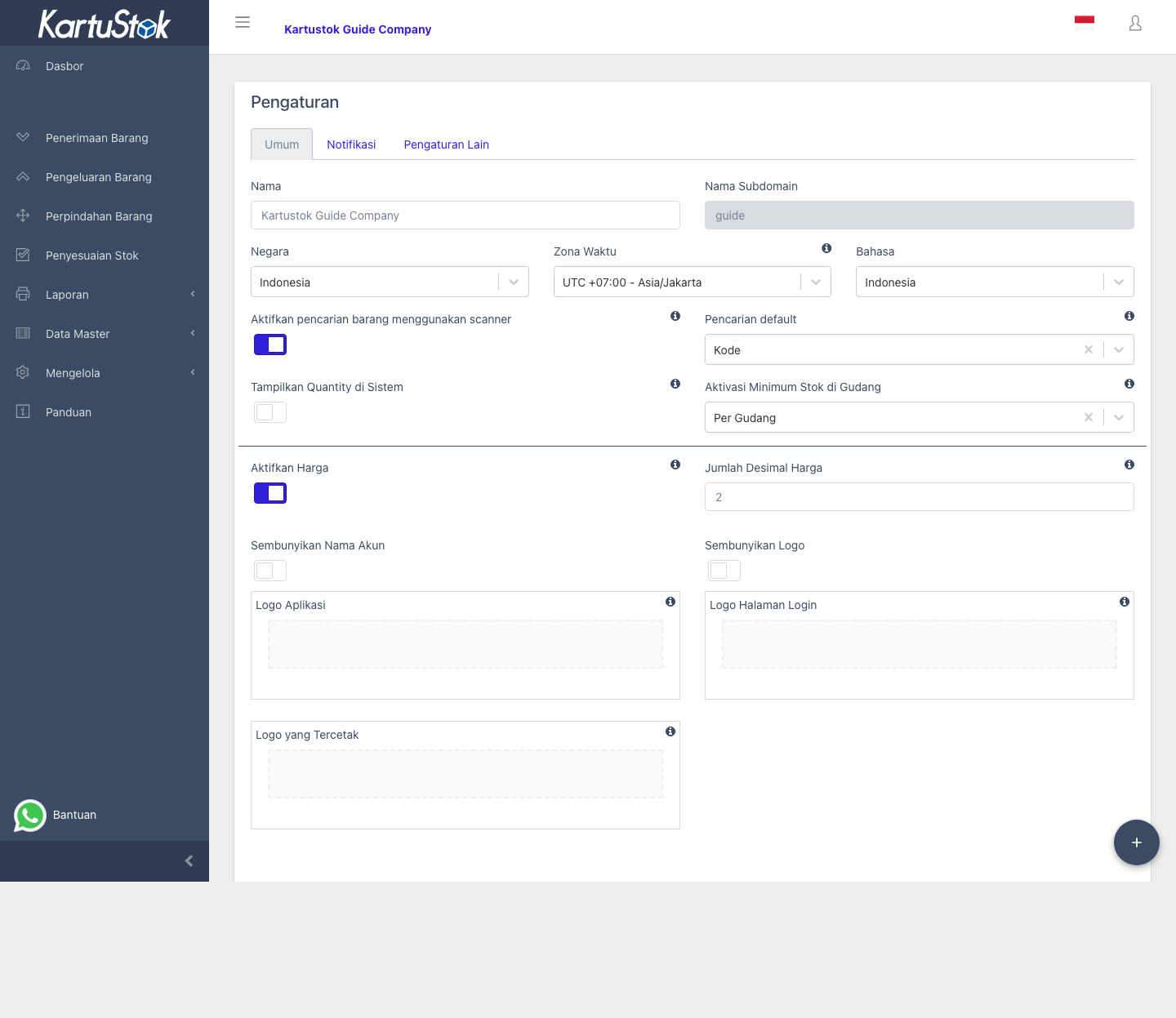
| Setting | What It Controls | Notes |
|---|---|---|
| Company identity | Company name and basic profile. | Used across the app and printed documents. |
| Default Search | Preferred search field for selecting items. | Choose the field users naturally know, such as item code or item name. |
| Show Quantity System | Whether system stock appears during item selection. | Useful for warehouse staff who need to see available stock. |
| Enable Warehouse Grouping | Turns on two-level stock locations: Warehouse Group -> Location. | Use it when one company has branches, large warehouses, or many storage areas. |
| Warehouse minimum stock mode | Minimum stock mode. | Choose the mode that matches the company structure: inactive, company-wide, location-level, or Warehouse Group-level when grouping is active. |
| Enable Price | Turns on price visibility for the company. | Default is off for existing and new companies. |
| Price Decimal | Decimal precision for price display. | Required when Enable Price is active. |
Recommended Setup Flow
- Confirm company name and basic information.
- Choose default item search behavior.
- Decide whether users should see system quantity while selecting items.
- Decide whether the company needs Warehouse Grouping.
- Choose minimum stock mode.
- Decide whether pricing should be enabled.
- Save settings and refresh account data if another session is already open.
Warehouse Grouping
Enable Warehouse Grouping when the company needs a parent warehouse structure. With grouping active, KartuStok uses two levels:

| Level | Meaning | Example |
|---|---|---|
| Warehouse Group | Branch, site, large warehouse, or operational area. | Bandung Branch, Main DC, Production Area. |
| Location | Detailed stock location inside the group. | Main Storage, Return Area, Staging Area. |
If Warehouse Grouping is off, users work with one simple location list. If it is on, transaction and report filters can ask users to choose the Warehouse Group first, then the Location inside it.
Important: Decide this before importing many warehouses, creating many transactions, or setting minimum stock. Changing the structure later can make old group/location naming harder for users to understand.
Warehouse Grouping also affects minimum stock options. When grouping is enabled, KartuStok can track minimum stock at the detailed Location level or at the parent Warehouse Group level.
Operational Example: Small Warehouse Setup
For a company that only tracks stock in/out without price visibility for staff:
| Decision | Recommended Setting | Operational Impact |
|---|---|---|
| Search by code | Set Default Search to item code if warehouse labels use codes. | Users find items faster during transactions. |
| Show available stock | Enable Show Quantity System for warehouse staff if they need stock visibility. | Staff can avoid issuing more than available stock. |
| Minimum stock by warehouse | Use the warehouse or Location mode that matches the company structure when each warehouse or Location has a different reorder point. | Warehouse Minimum Stock report becomes the control report. |
| Hide price from staff | Keep Enable Price off, or enable it only with restricted role permission. | Transaction users can work with quantity only. |
For an owner/finance team that needs basic value visibility, enable Enable Price, set Price Decimal, then restrict the Price row in Roles & Permissions.
Important: Enabling company pricing alone is not enough. Price fields stay hidden until the user role also allows the related Price permission.
Minimum Stock Mode
| Mode | Use When |
|---|---|
| Inactive | The company does not track minimum stock in KartuStok. |
| Union | Each item has one minimum target for the whole company. This shows the Minimum Stock report. |
| By Warehouse | Each warehouse has different minimum targets. When Warehouse Grouping is active, this means Warehouse Group-level minimum stock. This shows the Warehouse Minimum Stock report. |
| By Locator | Available when Warehouse Grouping is active. Use it when each detailed Location inside a Warehouse Group needs a different minimum target. This shows the Warehouse Minimum Stock report. |
Choose this before importing minimum stock data because the import format and report visibility depend on the selected value.
Minimum Stock Notification Flow
Minimum stock control has three parts:
- Choose the company minimum stock mode in Settings.
- Fill item minimum quantity or import minimum stock according to the selected mode.
- Configure notification recipients and wording if the company uses email notification.
Use Minimum Stock or Warehouse Minimum Stock report to review current low-stock items. Email notification helps alert users, but the report remains the main place to verify the current condition.
If notification email is used, keep the recipient list focused on people who can actually reorder, transfer, or investigate stock. Review Email Template if the notification wording needs company-specific instructions.
Pricing Setting
Pricing needs two gates:
- Enable Price must be active in company settings.
- The user role must have price permission in Roles & Permissions.
If pricing is enabled but a user does not have permission, price fields stay hidden for that user. If a user has price permission but pricing is disabled, price fields stay hidden for everyone.
Common Problems
| Problem | Fix |
|---|---|
| Price Decimal cannot be saved | Fill a numeric value when Enable Price is active. |
| Users are confused by warehouse choices | Check whether Warehouse Grouping is enabled and confirm master data uses clear group/location names. |
| Minimum stock report does not match expectation | Check the selected minimum stock mode. |
| User sees old setting | Ask the user to refresh or log in again so account data is reloaded. |