
Calendar Period
Calendar Period is the monthly lock control for stock transactions. It lets an administrator lock or unlock each month separately for each transaction type: Receipt, Issue, Move, Adjustment, Item Assembly, and Item Disassembly.
Use it when a period has been reviewed and the company no longer wants users to complete or change transactions dated inside that month. This protects historical stock balances from backdated changes.
Menu Location and Access
Open Manage -> Transaction -> Calendar Period. The role must include Calendar Period view access. Changing the locked status requires Calendar Period update access.
When to Use It
Use Calendar Period after a warehouse closing, stock review, or monthly operational cut-off.
Example: after the May stock review is finished, the supervisor can lock May 2026 for Issue, Adjustment, Item Assembly, or Item Disassembly. Users can still view historical data, but they cannot complete affected transaction changes dated in that locked month.
How It Works
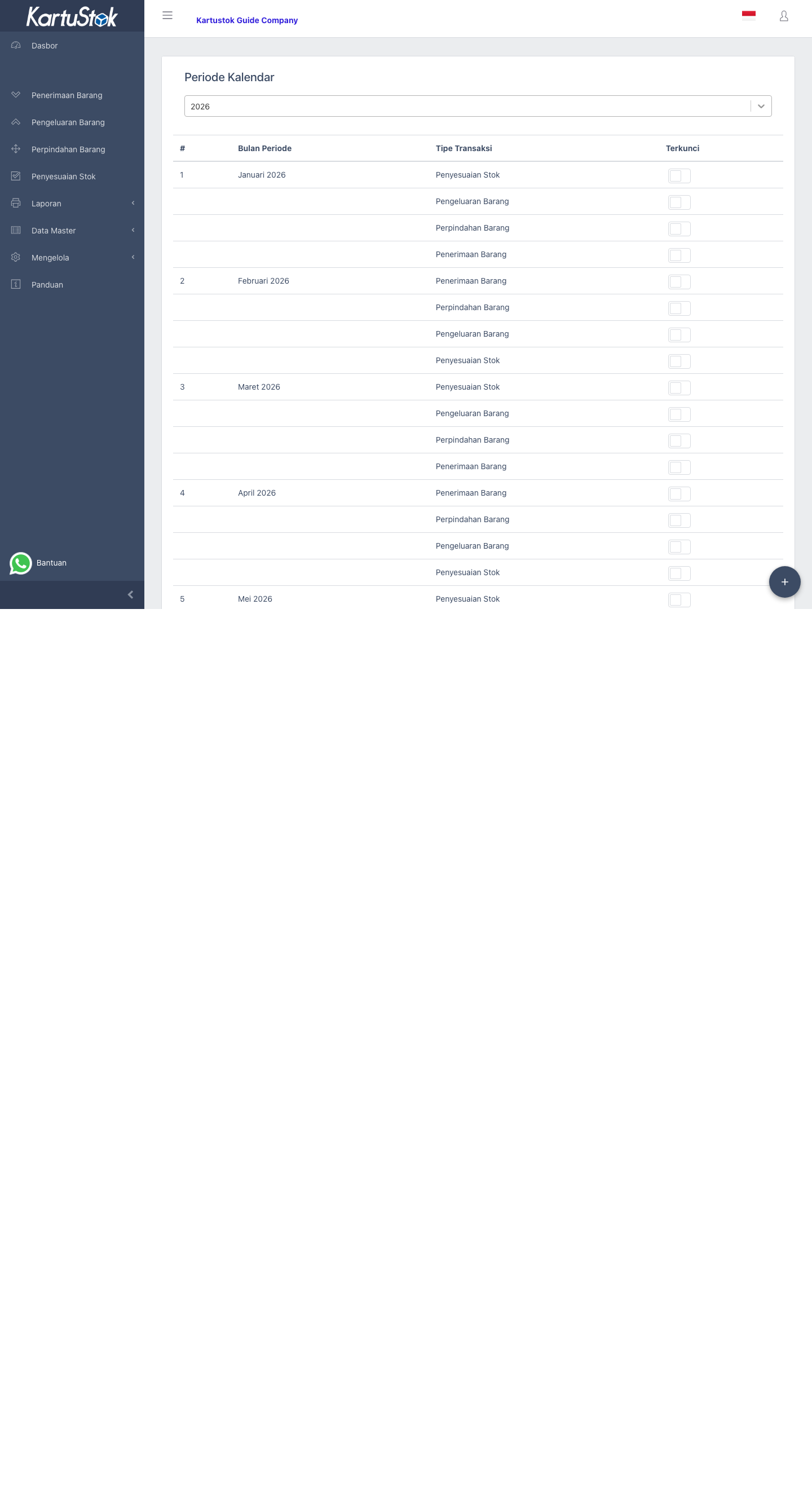
| UI Column | Meaning |
|---|---|
| Month Period | The month and year being controlled. |
| Transaction Type | The transaction family affected by the lock. |
| Locked | When active, transactions for that month and type are blocked from being completed or changed. |
The lock is checked by transaction date and transaction type. A locked Issue period does not automatically lock Receipt, Move, Adjustment, Item Assembly, or Item Disassembly for the same month.
Important: Once a month and transaction type are locked, users should treat completed stock changes in that period as closed. Reopen only for controlled correction, then lock again.
New companies already receive generated monthly periods for several years around the registration year. In normal use, administrators maintain the lock status; they do not manually create every month from scratch in the UI.
Lock a Period
- Open Calendar Period.
- Select the year.
- Find the month and transaction type.
- Turn on Locked for that row.
- Ask users not to continue editing transactions in that period.
- If a correction is required later, unlock the specific month and transaction type, complete the correction, then lock it again.
What Users See
If a user tries to complete or update a transaction in a locked period, KartuStok rejects the action with a locked-period message such as Calendar period is locked or Your selected period has been locked.
Draft behavior can differ from completed transaction behavior, but any transaction that affects stock should be treated as blocked once its month and transaction type are locked.
Common Problems
| Problem | Fix |
|---|---|
| User cannot complete an old transaction | Check whether the month and transaction type are locked. |
| Only one transaction type is blocked | Lock status is maintained per transaction type, so check the row for Receipt, Issue, Move, Adjustment, Item Assembly, or Item Disassembly. |
| User cannot change the lock switch | Check Calendar Period update permission. |
| The wrong month was locked | Unlock the affected row, correct the transaction if needed, then lock the intended row. |