
Pricing
Important note
Pricing in KartuStok is informational pricing, not an accounting or advanced costing module.
This feature covers Default Cost as the item reference cost, Unit Price as the transaction-line price snapshot, and Amount as quantity x unit price. Price fields appear only when Enable Price is active and the user's role has price permission.
Pricing does not include FIFO/LIFO, moving average, official HPP/COGS, accounting journals, a full stock valuation report, or automatic revaluation of historical transactions.
Pricing adds informational value fields to item, transaction, print, and report views. It is not a full accounting valuation engine.
Use pricing when the company wants users with permission to see reference cost and transaction value snapshots without turning KartuStok into an accounting system.
Availability Rules
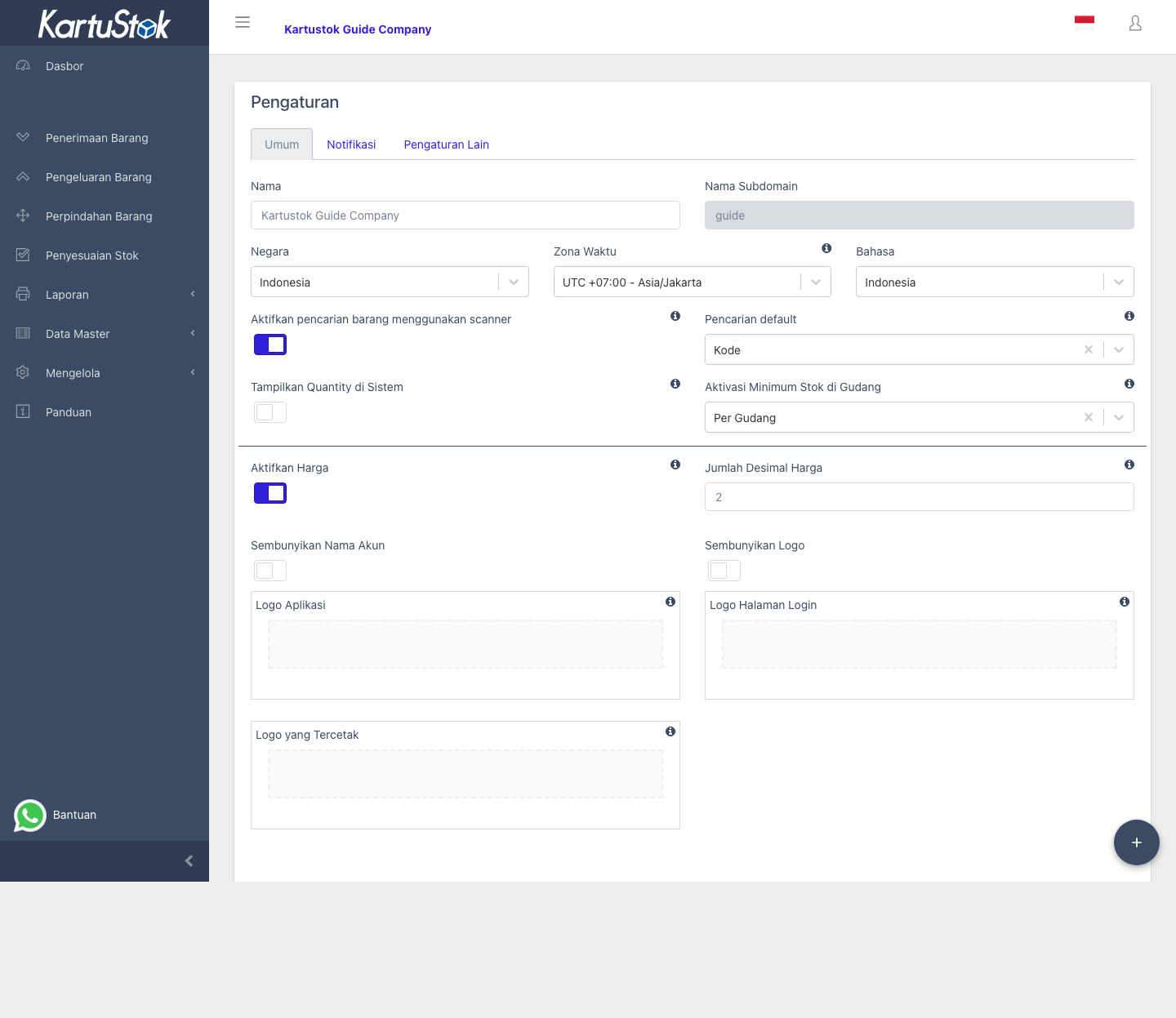
Pricing appears only when both conditions are true:
- Enable Price is active in company settings.
- The user's role has the correct switch enabled in the Price row.
Price Fields
| Field | Location | Meaning |
|---|---|---|
| Default Cost | Item master data. | Reference item cost. |
| Unit Price | Transaction line. | Price snapshot for that transaction line. |
| Amount | Transaction line or print output. | Quantity multiplied by Unit Price. |
| Price Decimal | Company settings. | Decimal precision used when displaying prices. |
Price Row in Roles & Permissions
| Role Table Column | User Can |
|---|---|
| View | See price fields, price print columns, and price report columns. |
| Update | Change Default Cost and Unit Price where the form allows it. |
If a user can view price but cannot edit price, price fields may appear read-only or be filled automatically.
Where Price Appears
| Area | Behavior |
|---|---|
| Item form | Default Cost appears when allowed. |
| Transaction line | Unit Price and Amount appear when allowed. |
| Transaction print | Unit Price, Amount, and Total Amount appear when allowed. |
| Detail Stock Card | Default Cost or Unit Price can appear when detailed options are enabled. |
Operational Examples
| Scenario | Recommended Setup | Result |
|---|---|---|
| Warehouse staff should not know price | Enable Price only if needed for other teams, but keep Staff role without Price View. | Staff sees quantity-only transaction screens. |
| Owner wants transaction value | Enable Price, give Owner/Finance Price View, and use transaction print/export. | Owner sees Unit Price, Amount, and Total Amount where allowed. |
| Purchasing maintains reference cost | Give trusted user Price Update. | User can maintain Default Cost and transaction Unit Price. |
| Company does not use price yet | Keep Enable Price off. | All price fields stay hidden even if some role has price permission. |
Pricing values are informational snapshots. Changing Default Cost later does not recalculate old transaction lines.
Common Problems
| Problem | Fix |
|---|---|
| Price fields missing for everyone | Enable Price in settings. |
| Price fields missing for one user | Enable the View switch on the Price row. |
| User cannot change price | Enable the Update switch on the Price row if policy allows it. |
| Decimal format is wrong | Update Price Decimal in settings. |